
Last updated on
Oct 31, 2026
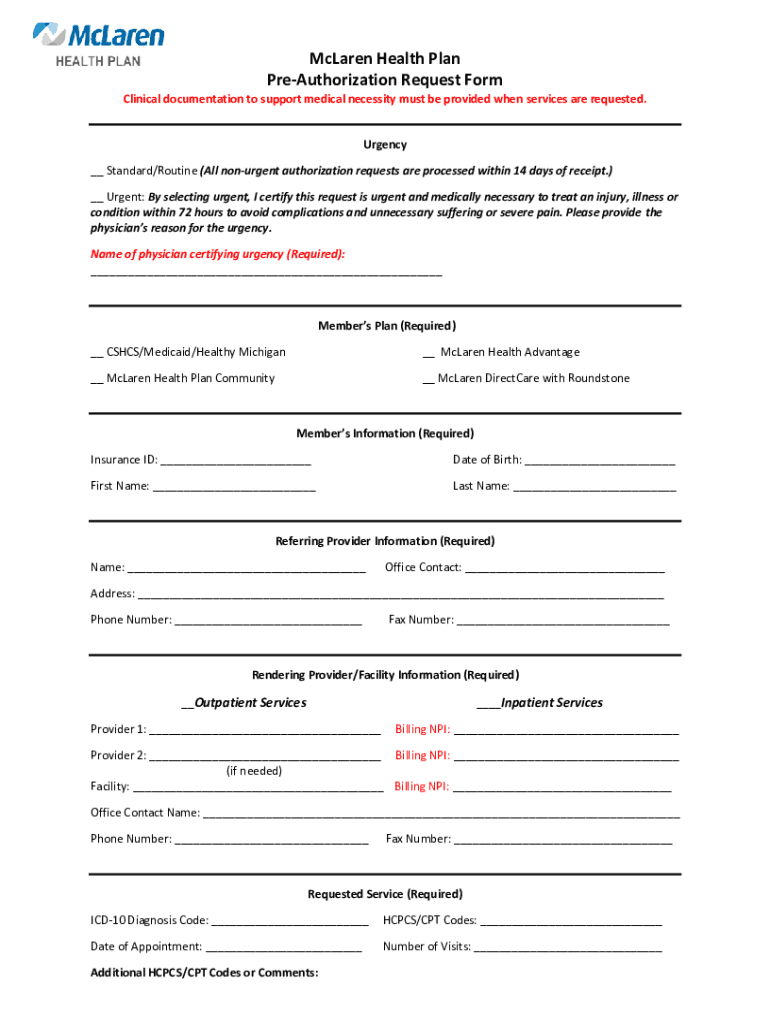
MI McLaren Health Plan Pre-Authorization Request Form 2020 free printable template
pdfFiller is not affiliated with any government organization

Fill out
Complete the form online in a simple drag-and-drop editor.

eSign
Add your legally binding signature or send the form for signing.

Share
Share the form via a link, letting anyone fill it out from any device.

Export
Download, print, email, or move the form to your cloud storage.
Why pdfFiller is the best tool for your documents and forms


End-to-end document management
From editing and signing to collaboration and tracking, pdfFiller has everything you need to get your documents done quickly and efficiently.
Accessible from anywhere
pdfFiller is fully cloud-based. This means you can edit, sign, and share documents from anywhere using your computer, smartphone, or tablet.
Secure and compliant
pdfFiller lets you securely manage documents following global laws like ESIGN, CCPA, and GDPR. It's also HIPAA and SOC 2 compliant.
What is MI McLaren Health Plan Pre-Authorization Request Form
The McLaren Health Plan Pre-Authorization Request Form is a healthcare document used by members to request pre-authorization for medical services and pharmacy treatments.
pdfFiller scores top ratings on review platforms




Very good service. Has many plugins and addons that are helpful such as google drive linkage
Great product! Recommended! Just what I was looking for!
Who needs MI McLaren Health Plan Pre-Authorization Request Form?
Explore how professionals across industries use pdfFiller.

MI McLaren Health Plan Pre-Authorization Request Form is needed by:
-
Patients seeking medical services
-
Providers referring patients for treatment
-
Pharmacists requesting medication approval
-
Insurance agents managing claims
-
Healthcare administrators ensuring compliance
Comprehensive Guide to MI McLaren Health Plan Pre-Authorization Request Form
What is the McLaren Health Plan Pre-Authorization Request Form
The McLaren Health Plan Pre-Authorization Request Form is a critical component of the healthcare process, specifically designed to streamline the pre-authorization of medical services and pharmacy treatments. This form is essential for ensuring that the requested services are both medically necessary and covered under the plan. Accurate completion is vital, as it directly impacts the success of the authorization request.
-
The pre-authorization process facilitates timely access to necessary treatments.
-
Specific medical services and pharmacy treatments often require advance approval.
-
Completing the form correctly is crucial for obtaining necessary approvals.
Purpose and Benefits of the McLaren Health Plan Pre-Authorization Request Form
This pre-authorization request form serves multiple purposes for both patients and healthcare providers. Firstly, it ensures that services requested are essential and medically necessary, thus preventing potential billing issues later on. For providers, it helps in documenting the information necessary for reimbursement, ultimately leading to a smoother process for all parties involved.
-
Confirmation of medical necessity helps avoid unpaid claims.
-
Providers benefit from improved documentation for reimbursement processes.
-
Streamlining the authorization process enhances the patient experience.
Eligibility Criteria for the McLaren Health Plan Pre-Authorization Request Form
The eligibility to utilize the McLaren Health Plan Pre-Authorization Request Form is determined by specific criteria related to both members and healthcare providers. Eligible individuals must meet particular medical needs that warrant pre-authorization. Additionally, Michigan residents should be aware of any state-specific requirements that impact their eligibility.
-
Members must be part of the McLaren Health Plan program.
-
Healthcare providers must be recognized by the health plan.
-
Certain medical conditions will specifically require pre-authorization.
Information You'll Need to Gather Before Filling Out the McLaren Health Plan Pre-Authorization Request Form
Preparation is key when completing the McLaren Health Plan Pre-Authorization Request Form. Users should gather essential information beforehand to facilitate a smooth application process. This includes key details such as member identification, provider information, and correct treatment codes.
-
Member identification details, including insurance ID.
-
Provider details such as names and specialties.
-
ICD-10 and HCPCS/CPT codes necessary for the requested treatments.
How to Fill Out the McLaren Health Plan Pre-Authorization Request Form Online (Step-by-Step)
Filling out the McLaren Health Plan Pre-Authorization Request Form online can easily be done by following a series of straightforward steps. Users should familiarize themselves with common fields like 'Insurance ID' and 'Diagnosis Code' to ensure accurate completion of the form.
-
Access the form on the pdfFiller platform.
-
Input member and provider information in the designated fields.
-
Carefully enter the required treatment codes and details.
-
Review the form for accuracy before submission.
-
Submit the form through the selected delivery method.
Common Errors and How to Avoid Them When Submitting the McLaren Health Plan Pre-Authorization Request Form
Identifying common submission errors is essential to avoid delays or outright rejection of the pre-authorization request. Users should pay close attention to the completeness and accuracy of the information on the form to ensure a seamless processing experience.
-
Frequent errors include missing fields and incorrect codes.
-
Validating entries against official sources can mitigate mistakes.
-
Double-checking all entries before submission is crucial for approval.
Submission Methods and Delivery of the McLaren Health Plan Pre-Authorization Request Form
Understanding the various submission methods for the McLaren Health Plan Pre-Authorization Request Form can simplify the process. Users have multiple options for delivery, depending on what suits their needs best.
-
Online submission through the pdfFiller platform.
-
Mailing the completed form to the designated health plan address.
-
Faxing the request to the appropriate number provided by the healthcare provider.
What Happens After You Submit the McLaren Health Plan Pre-Authorization Request Form
After submitting the McLaren Health Plan Pre-Authorization Request Form, users can expect a structured review process conducted by the health plan. Notification regarding the outcome of the submission will be communicated in a timely manner.
-
The review process evaluates the necessity and appropriateness of the requested services.
-
Users will be notified of either approval or denial of their request.
-
Next steps will depend on the decision made regarding the request.
Security and Compliance When Using the McLaren Health Plan Pre-Authorization Request Form
Users can rest assured about the security of their information while using the McLaren Health Plan Pre-Authorization Request Form. pdfFiller employs various security measures to protect sensitive data, including encryption and compliance with relevant regulations.
-
256-bit encryption secures users' personal information.
-
pdfFiller adheres to HIPAA and GDPR compliance measures.
-
Care should still be taken when handling sensitive healthcare documents.
Using pdfFiller to Complete the McLaren Health Plan Pre-Authorization Request Form
Utilizing pdfFiller for completing the McLaren Health Plan Pre-Authorization Request Form offers numerous advantages. The platform features a user-friendly interface that makes the process efficient and secure.
-
Features like eSigning and document saving provide added convenience.
-
Security protocols ensure the confidentiality of your documents.
-
Engaging with pdfFiller allows for faster processing and less hassle.
How to fill out the MI McLaren Health Plan Pre-Authorization Request Form
-
1.To access the McLaren Health Plan Pre-Authorization Request Form, open pdfFiller and navigate to the search bar. Type the name of the form to locate it quickly.
-
2.Once the form is open, review the fields that need to be completed. You’ll find designated areas for personal information, provider details, and requested services.
-
3.Gather all necessary information before filling out the form. This includes the member's Insurance ID, Date of Birth, and ICD-10 diagnosis codes, as well as details about the referring and rendering providers.
-
4.In pdfFiller, you can click on the blank fields to enter the required information. Utilize the provided checkboxes for urgency certifications and other options.
-
5.After completing all necessary sections, take a moment to review the form for accuracy. Ensure that all fields are filled and the information provided is correct.
-
6.When satisfied with your entries, look for the 'Save' option in pdfFiller. This ensures your changes are not lost and allows for future edits if needed.
-
7.To submit the form, choose the appropriate submission method provided by pdfFiller. You may save it as a PDF to print or download, or email it directly to the concerned provider or insurance company.

Who is eligible to use the McLaren Health Plan Pre-Authorization Request Form?
Eligibility to use this form typically includes patients covered under the McLaren Health Plan, their healthcare providers, and pharmacies involved in treatment. Ensure that the patient meets the health plan's guidelines.
What are the deadlines for submitting this pre-authorization request?
Deadlines for submission can vary based on the specific medical service or treatment requested. It's advisable to check with your healthcare provider or McLaren Health Plan for any time-sensitive requirements.
What is the method to submit the completed form?
The completed McLaren Health Plan Pre-Authorization Request Form can be submitted via email or postal mail as directed by the guidelines of your healthcare provider. Ensure you send it to the correct address.
What supporting documents are needed with the form?
Typically, you may need to provide medical records, a referral note from the physician, or any other documentation supporting medical necessity. Check with McLaren Health Plan for specific requirements.
What common mistakes should I avoid when filling out the form?
Common mistakes include omitting required fields, providing inaccurate insurance information, and not attaching necessary supporting documents. Always double-check your entries before submission.
How long does it take to process the pre-authorization request?
Processing times can vary. Generally, it may take a few days to a couple of weeks depending on the complexity of the request. It's best to follow up with McLaren Health Plan if you experience delays.
Can I make changes to my submission after I’ve sent the form?
Once submitted, changes may require a new request to be filed. It is crucial to ensure all information is accurate before submission to avoid complications.
MI McLaren Health Plan Pre-Authorization Request Form Form Versions
Related Forms





Related Catalogs
Get the latest insights from our blog


If you believe that this page should be taken down, please follow our DMCA take down process
here
.
This form may include fields for payment information. Data entered in these fields is not covered by PCI DSS compliance.